AR Code Object Capture
 AR Splat
 AR GenAI
 AI Code / AI Try-On
 AR Face Filter
 AR Video
 3D Files Upload
 AR Logo
 AR Photo
 AR Portal
 AR Text
 AR Data API
 Education & Schools
 E-commerce Brands & Online Stores
 Fitness & Sports Clubs
 Manufacturing, Training & Safety
 Marketing Teams & Agencies
 Museums & Exhibitions
 Real Estate & Property Marketing
 Restaurants & Cafés
 Retail Stores & Showrooms
 Smart Cities & Urban Development
 Books, Guides & Magazines
 Business Cards
 Event Posters & Banners
 Event Tickets & Access
 Flyers & Brochures
 Labels & Product Information
 Machinery & Equipment
 Product Packaging
 Websites & Online Stores
WebAR Shopping for Ecommerce: Helping Customers Make Better Buying Decisions
Tutorials | 08/11/2026 |
AR shopping is getting a closer examination of what makes it useful. A conceptual paper published on November 3, 2026, explores whether AI-assisted augmented reality helps customers make better buying decisions. Its central distinction matters to retailers: feeling confident about a purchase does not necessarily mean choosing a suitable product.
For ecommerce brands, this creates a practical opportunity. Interactive previews can become part of a clearer product explanation, helping shoppers examine appearance while keeping specifications, options, and purchase conditions easy to find. The commercial goal is a customer who understands what they are ordering.
What the New AR Shopping Research Examines
Published in the Journal of Theoretical and Applied Electronic Commerce Research, Consumer Agency and Decision Quality in AI-Assisted Augmented-Reality Commerce proposes a framework for evaluating customer control and decision quality. It considers how shoppers inspect, redirect, or reject assistance across connected shopping tools.
The framework remains unvalidated. The paper does not report an experiment proving higher sales, fewer returns, or benefits from AR Code. Its contribution is a set of questions for further testing. The retail recommendations below are practical editorial suggestions, not measured outcomes from the study.
Give Every Product Preview a Clear Purpose
Augmented reality adds digital content to a view of the physical environment. In shopping, that can help customers explore a product’s form and appearance beyond a conventional photograph.

Start by identifying the question a preview should answer. For a handbag, it might be the shape of the base or the arrangement of its handles. For a decorative object, it could be the silhouette from different viewpoints. A useful preview has a specific role in the product presentation.
Avoid asking one visual experience to explain everything. Material feel, load capacity, care requirements, and delivery conditions still need appropriate descriptions. Give customers complementary information so they can move from visual interest to an informed comparison.
This AR Code example pairs a handbag representation with a scannable code. A retailer could use this format alongside product photographs and specifications, giving shoppers another way to examine the item before ordering.
Bring AR Product Visualization to Existing Sales Materials
AR Code’s ecommerce product visualization solution supports sharing product experiences through AR QR Codes and direct links. Customers can access supported experiences on compatible devices without installing a dedicated viewing app.
This gives brands several practical entry points. A desktop product page can display a code for mobile viewing. A digital catalog can include a direct link. Printed sales materials can connect an item’s description to its corresponding visual experience.

Keep the invitation specific. “Explore this bag in 3D” explains the next step more clearly than “Discover more.” Place it near the relevant product information so customers understand which item they will see and why opening the preview may help.
Build Product Models Around the Actual Item
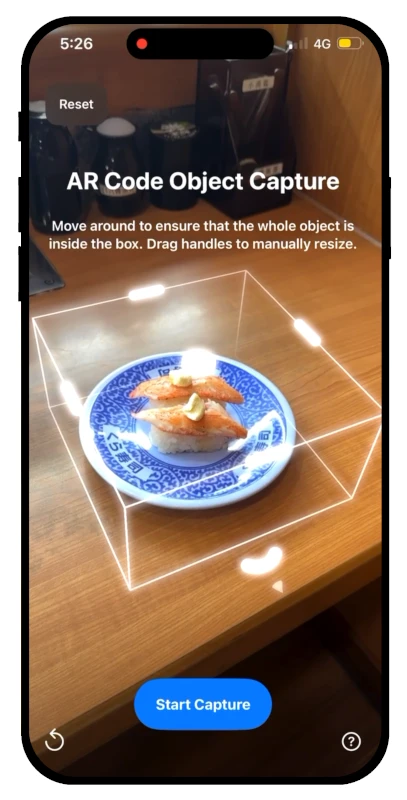
AR Code Object Capture turns suitable physical objects into 3D models using recorded views of the item. The solution is available through web and supported Apple-device workflows, with AR QR Codes for sharing the resulting content.
Before creating an asset, identify the exact product and variant it represents. Record the item’s reference number, finish, and dimensions in your content brief. This gives the team a clear basis for checking the finished model against the listing.
Inspect the result from several angles. Check whether handles, edges, openings, and other important features are represented clearly. If a detail is missing or ambiguous, correct the asset or provide a supporting photograph rather than leaving customers to infer it.
Where physical fit matters, verify model scale before publication and keep written measurements prominent. A visual preview should support the customer’s assessment; it should not be presented as a guarantee that an item will fit a particular space or application.
Keep Appearance and Product Compatibility Separate
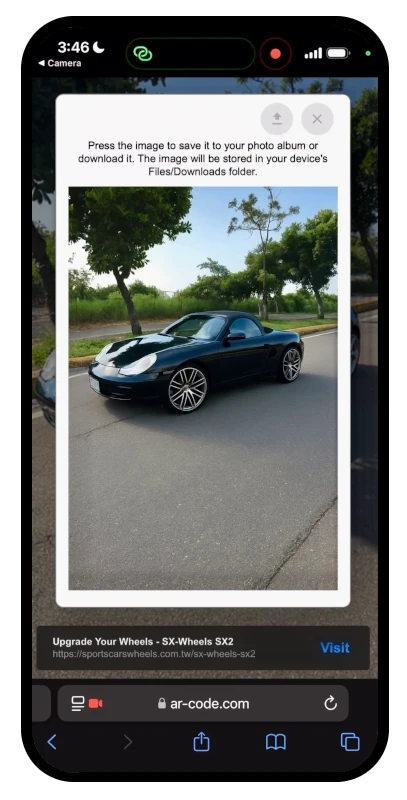
Some products are easy to appreciate visually but require additional checks before purchase. A wheel, for example, has a visible design and separate technical compatibility requirements. An attractive representation cannot establish those requirements by itself.

For products with compatibility requirements, make the relevant specification or selection guide available beside the preview. Use the product page to state what the visual shows and what buyers must confirm separately.
The same principle applies to configurable products. If the preview represents one finish or configuration, identify it clearly. Review the experience whenever the product listing changes so customers do not compare current specifications with an outdated visual.
Use Demonstrations When Movement Explains More
A static model is useful for form, but some questions concern how a product works. A short demonstration may explain a folding mechanism, removable component, or adjustment more clearly than another product angle.

AR Video supports publishing uploaded MP4 or MOV videos as AR experiences. Retail teams can prepare a focused demonstration and share it through an AR QR Code on suitable sales materials.
Choose one action per demonstration and show it clearly. Keep the product version consistent with the listing, add readable explanations where needed, and avoid edits that conceal an important step. Customers should leave with a more concrete understanding of the item.
Connect Online Research with the Showroom Visit
AR Code’s retail and showroom applications extend product previews to labels, catalogs, and display signage. This provides another place to make useful visual information available during product consideration.

A sales team could introduce a preview during a conversation and provide its link for later reference. The accompanying product page should retain the specifications and contact information needed to continue that discussion.
Keep the visual experience easy to use without assistance. Test scanning distance, lighting, loading, and the clarity of the invitation in the actual display setting. A resource that works well at a desk may need adjustment on a busy retail floor.
Frequently Asked Questions
What is AR shopping?
AR shopping uses augmented reality to help customers explore digital product representations within a view of their surroundings. It can complement photographs, descriptions, and other buying information.
Can customers view AR Code products without installing an app?
Yes. Supported AR Code experiences are available without a dedicated viewing app on compatible devices. Retailers should test their chosen experience on the devices their customers commonly use.
Does an AR preview guarantee product fit or compatibility?
No. Retailers should verify the model’s scale and accuracy, publish dimensions, and provide any required compatibility information. Customers still need to check the requirements relevant to their purchase.
How should a retailer start using AR product previews?
Select one product with a clear visualization need, create or upload a reviewed asset, and connect it to the listing. Test access and customer understanding before expanding to more products.
Tutorials - Latest Blog Posts
Tutorial on Leveraging the AR Code API Key

Maximize business growth and digital innovation with AR Code SaaS solutions, the premier augmented reality platform for effortless AR integration. Increase operational efficiency, captivate customers, and drive results-powered marketing using advanced AR tools like Object Capture, AR GenAI, and comprehensive...
How to Create a Customized AR Code Experience?

Enhance your business with AR Code by delivering interactive augmented reality experiences that captivate and engage your audience instantly. AR Code’s advanced custom pages put your brand front and center, showcasing dynamic visuals and compelling calls-to-action as soon as your AR code is scanned. Capture...
How to Manage the File Size Limitation for 3D Models on AR Code ?

Accelerate your business growth and boost customer engagement with AR Code SaaS solutions. Seamlessly integrate immersive augmented reality and interactive 3D content into your products, marketing strategies, and internal communications. With AR Code, businesses can showcase dynamic product demonstrations, run...
VIDEO TUTORIAL: How to make a 3D Model optimized for Augmented Reality with AR Code?

Accelerate your business marketing and enhance customer engagement with AR Code SaaS solutions. Effortlessly incorporate cutting-edge augmented reality into your brand by optimizing 3D models in Blender. This guide provides essential strategies for optimizing 3D assets, ensuring that your AR Code implementation...
VIDEO TUTORIAL: How to convert a 3D CAD model from STP STEP or IGS IGES formats to GLB or OBJ
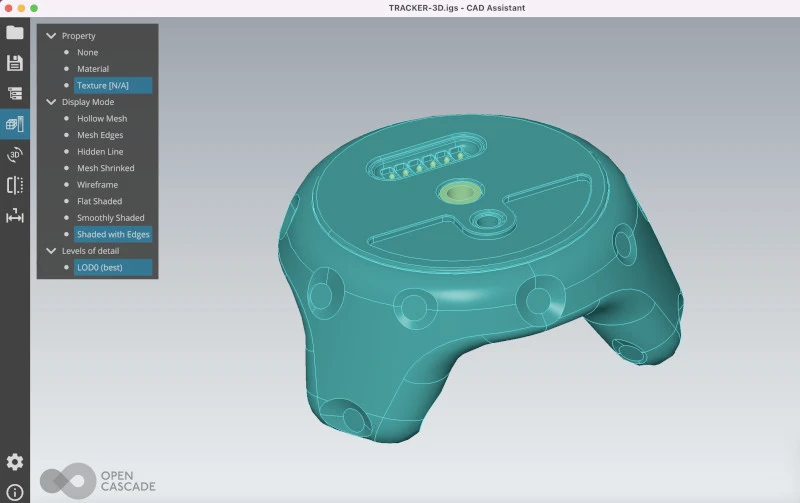
3D CAD models are essential for digital transformation in industries such as industrial manufacturing, real estate, creative agencies, and product designers. These models streamline project workflows, drive efficient collaboration, and enable precise design reviews. With AR Code SaaS solutions, businesses can...
VIDEO TUTORIAL: How to compress / reduce the size of an industrial 3D CAD model with MeshLab and Blender?
Accelerate business growth and outpace competitors with AR Code SaaS solutions for advanced augmented reality. Showcase high-quality 3D models, efficiently reduce 3D file sizes in Blender, and present complex CAD content in your AR experiences. Start with our straightforward guide on how to scan AR codes for seamless...
VIDEO TUTORIAL: How to compress / reduce the size of a 3D model in Blender (GLB, GLTF, DAE, FBX, OBJ...)?
Blender stands out as a powerful open-source 3D design suite, enabling businesses to produce professional 3D graphics, animations, and VFX. Supporting various formats like GLB, GLTF, DAE, OBJ, ABC, USD, BVH, PLY, STL, FBX, and X3D, organizations leverage Blender to easily create and publish 3D models for object...
VIDEO TUTORIAL: How to Display a 3D Scan Photogrammetry in Augmented Reality with an AR Code

Accelerate business growth with the AR Code SaaS platform, engineered for fast photogrammetry uploads and immersive augmented reality rendering. With AR QR Codes, businesses can boost customer engagement, elevate conversion rates, and create memorable interactive brand experiences. Strengthen your marketing strategy...
VIDEO TUTORIAL: How to create an AR Portal and anchor it with an AR Code?

AR portals transform B2B marketing by delivering immersive augmented reality experiences that boost engagement and drive conversions. AR Code SaaS empowers brands to showcase products and services with interactive digital environments that accelerate purchase decisions and enhance customer loyalty. Key sectors...
VIDEO TUTORIAL: Generate 3D Text on AR Code

Enhance your business marketing, communication, training, and customer interaction with AR Text from AR Code. Instantly transform any message into immersive 3D AR animations. Distribute interactive messages across print, packaging, web, and events to amplify brand awareness and drive conversions. AR Text iOS App:...
163,336 AR experiences
73,769 Scans per day
149,082 Creators